QueueExplorer Professional 5.0.90是一款强大的队列与消息管理工具,支持MSMQ、Azure Service Bus、RabbitMQ及ActiveMQ。可轻松查看、编辑、复制、移动和删除消息,支持XML/JSON格式,助力开发人员高效排查故障。
原始标题:QueueExplorer Professional 5.0.90
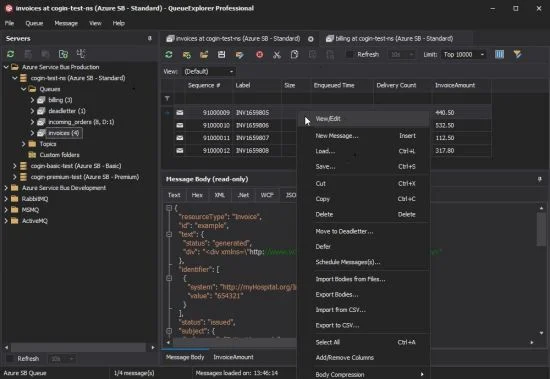
QueueExplorer Pro是一款用于理解、管理和排除队列和消息故障的软件。它支持多个消息队列系统,包括MSMQ、Azure ServiCE Bus、RabbitMQ 和ActiveMQ。
File size: 35 MB
The indispensable tool for working with queues and messages: understand and manage your system, figure out what went wrong, fix it.
Works with multiple queuing systems
QueueExplorer supports multiple systems from the same installation, without need for additional licensing: MSMQ, Azure Service Bus, RabbitMQ, and ActiveMQ.
With QueueExplorer you can do much more than with built-in management console – copy, move or delete messages, save and load, stress test, view and edit full message bodies (with support for XML, JSON, .Net objects…), and much more. QueueExplorer is a fast, native Windows application.
Benefits for Developers
Find out all about your messages
With QueueExplorer you can dig into your queues and see which message went where, whether they were correctly formatted, with correct headers and settings, etc.
Multiple viewers are at your disposal: JSON, XML, WCF, Hex, text with different encodings…
Develop and test producers and consumers separately
With QueueExplorer you can test individual pieces of your solution, or even simulate third party messages going in or out. You can create and edit test messages, send one by one or bunch of them together.
Test performance and load handling of your app
Send thousands of messages for performance testing to see how system handles that load.
Benefits for Admins
Troubleshoot, fix, and resend problematic messages
If something is wrong, QueueExplorer is the fastest and easiest way to investigate and fix incorrect, poison, or failed/deadletter messages.
See status of your system at glance
Check if some of queues are growing too large, if there are messages in deadletter queues, etc. With autorefresh functionality see how entire system works in near real time.
Filter and sort messages to quickly find important data
QueueExplorer allows you to quickly find messages you’re interested in. Professional edition allows you to even extract your business data from within messages using XPath, JSON, or Regex, and to immediately see e.g. invoice totals, etc.
Backup and restore messages
Backup messages to files, or move/copy them to another queue.
Copy, compare and sync queues, topics and other schema (metadata) objects
This can be used to migrate queues (and other objects) to another server, e.g. to propagate from development to production. Or just to compare and see which changes were made. Or to backup schema before changes are made. You can also duplicate queues with all their settings on the same server (Professional).
Multi system support
QueueExplorer supports multiple messaging system in one program. You don’t need to purchase new licenses if you decide to migrate to another system or already manage different message brokers.
This not only protects your investment, but also reduces learning curve in that process for all team members.
此处内容需要权限查看
会员免费查看1、VIP会员仅需30元全站资源免费下载!
2、资源默认为百度网盘链接,请用浏览器打开输入提取码不要有多余空格,如无法获取 请联系微信 yunqiaonet 补发。
3、分卷压缩包资源 需全部下载后解压第一个压缩包即可,下载过程不要强制中断 建议用winrar解压或360解压缩软件解压!
4、云桥CG资源站所发布资源仅供用户自学自用,用户需以学习为目的,按需下载,严禁批量采集搬运共享资源等行为,望知悉!!!
5、云桥CG资源站,感谢您的赞赏与支持!平台所收取打赏费用仅作为平台服务器租赁及人员维护资金 费用不为素材本身费用,望理解知悉!平台资源仅供用户学习观摩使用 请下载24小时内自行删除 如需商用请支持原版作者!请知悉并遵守!
6、For international users: If you do not have a Baidu Netdisk VIP account, please contact WeChat: yunqiaonet for assistance with logging into Baidu Netdisk to download resources..