

VovSoft Contact Manager 2.2 是一款专为 Windows 设计的轻量级联系人管理软件,支持导入导出 VCF 文件,便捷添加、编辑联系人信息,是桌面和笔记本电脑用户的理想选择。
原始标题:VovSoft Contact Manager 2.2
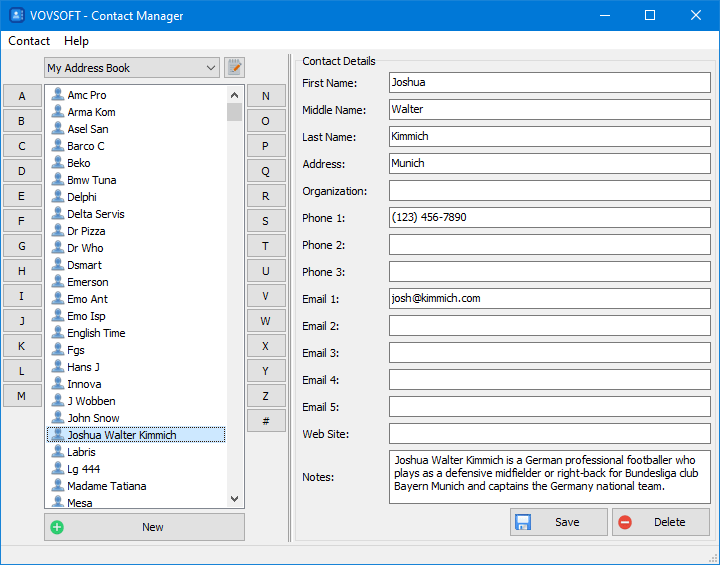
Vovsoft Contact Manager 是一款专为 Windows 桌面和笔记本电脑设计的轻量级、易用型联系人管理软件。它可以帮助用户高效地创建、组织、编辑和导入联系人信息。
File size: 4 MB
Vovsoft Contact Manager is a user-friendly software application designed for desktop and laptop computers.
Digital and portable contact book
This application streamlines the management of contact information by facilitating the seamless import and export of VCF files. This functionality proves invaluable to individuals who frequently switch between devices, ensuring a smooth and hassle-free transition of contact data. Adding new contacts is a breeze, allowing users to input comprehensive details, including names, phone numbers, email addresses, and more. Effortlessly navigating and editing existing contacts maintains the accuracy and currency of contact information.
Many of us rely on our phone’s memory to house our contacts, phone numbers, and email addresses. However, for Windows users, this program offers a compelling alternative. This lightweight software utility simplifies the creation of a digital address book, neatly organizing contacts in alphabetical order. There are two editions available, installer and portable, which requires no installation.
How to use Contact Manager
Upon launching the application, you encounter a straightforward interface with two distinct panels. The left panel neatly arranges all entries in the address book in alphabetical order, facilitating easy navigation by letter. Additionally, # section is reserved for entries beginning with numbers. The right-side panel presents a user-friendly form with editable fields, enabling you to store contact details such as first, middle, and last names, addresses, and organizations. Furthermore, you can record up to three phone numbers, five email addresses, a website, and custom notes for each contact in the address list.
此处内容需要权限查看
会员免费查看1、VIP会员仅需30元全站资源免费下载!
2、资源默认为百度网盘链接,请用浏览器打开输入提取码不要有多余空格,如无法获取 请联系微信 yunqiaonet 补发。
3、分卷压缩包资源 需全部下载后解压第一个压缩包即可,下载过程不要强制中断 建议用winrar解压或360解压缩软件解压!
4、云桥CG资源站所发布资源仅供用户自学自用,用户需以学习为目的,按需下载,严禁批量采集搬运共享资源等行为,望知悉!!!
5、云桥CG资源站,感谢您的赞赏与支持!平台所收取打赏费用仅作为平台服务器租赁及人员维护资金 费用不为素材本身费用,望理解知悉!平台资源仅供用户学习观摩使用 请下载24小时内自行删除 如需商用请支持原版作者!请知悉并遵守!
6、For international users: If you do not have a Baidu Netdisk VIP account, please contact WeChat: yunqiaonet for assistance with logging into Baidu Netdisk to download resources..











