

Disk Sorter 18.3.16 是强大的文件分类与磁盘分析工具,可识别3000多种文件类型,支持磁盘、NAS等存储分析,生成图表报告,执行文件清理,新版增强合规性与性能。
原始标题:Disk Sorter 18.3.16
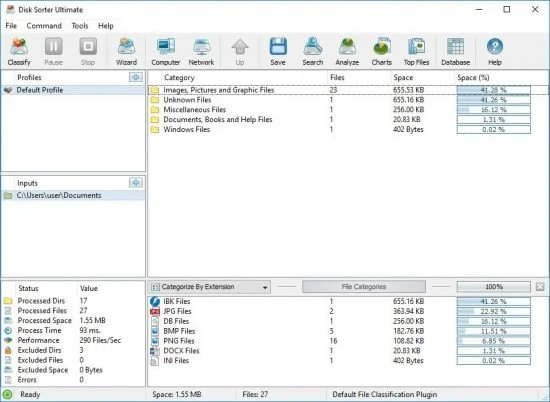
Disk Sorter 18 是一款功能强大的文件分类与磁盘空间分析解决方案,由 Flexense 开发。它可以帮助用户深入了解本地磁盘、网络共享、NAS 设备以及企业存储系统中的空间占用情况。
- 智能文件分类:内置插件可识别 3,000 多种文件类型,支持按扩展名、创建/修改/访问日期以及用户名进行分类。
- 磁盘空间可视分析:直观展示哪些类型的文件占用了最多的磁盘空间,并支持生成饼图和各类统计图表。
- 高级文件管理:支持直接在软件内执行文件的复制、移动、删除等清理操作。
- 多格式报告导出:支持将分类和分析结果导出为 PDF、HTML、XML、JSON、CSV 以及 SQL 数据库。
- 第 18 版新特性:增强了合规性功能(支持唯一报告 ID 和哈希签名)、改进了结果对话框,并大幅提升了处理性能与容错能力。
File Size: 26 MB
DiskSorter is a powerful file classification solution allowing one to classify files in disks, directories, network shares and NAS storage devices, save file classification reports, export file classification results to an SQL database, perform advanced history trend analysis operations and multiple types of file management operations on categories of files.
DiskSorter Main GUI Application
DiskSorter provides a number of built-in file classification plugins capable of recognizing more than 3,000 types of files and allowing one to classify files by the file type, extension, user name, creation, last modification and last access dates, etc. Users are provided with the ability to generate various types of pie charts, categorize and filter file classification results and save file classification reports into a number of standard formats including HTML, PDF, Excel, text, CSV, XML and the DiskSorter native report format………….
System Requirements
Windows XP
Windows Vista
Windows 7
Windows 8
Windows 10
Windows 11
Server 2003
Server 2008
Server 2008 R2
Server 2012
Server 2012 R2
Server 2016
Server 2019
Server 2022
Server 2025
此处内容需要权限查看
会员免费查看1、VIP会员仅需30元全站资源免费下载!
2、资源默认为百度网盘链接,请用浏览器打开输入提取码不要有多余空格,如无法获取 请联系微信 yunqiaonet 补发。
3、分卷压缩包资源 需全部下载后解压第一个压缩包即可,下载过程不要强制中断 建议用winrar解压或360解压缩软件解压!
4、云桥CG资源站所发布资源仅供用户自学自用,用户需以学习为目的,按需下载,严禁批量采集搬运共享资源等行为,望知悉!!!
5、云桥CG资源站,感谢您的赞赏与支持!平台所收取打赏费用仅作为平台服务器租赁及人员维护资金 费用不为素材本身费用,望理解知悉!平台资源仅供用户学习观摩使用 请下载24小时内自行删除 如需商用请支持原版作者!请知悉并遵守!
6、For international users: If you do not have a Baidu Netdisk VIP account, please contact WeChat: yunqiaonet for assistance with logging into Baidu Netdisk to download resources..











