

WinDataReflector 4.0.1.1是一款轻量级文件同步与备份工具,支持本地、网络共享及云端数据同步。提供可视化文件对比、双向同步和自定义规则,兼容Google Drive、Dropbox、OneDrive、FTP等,仅3.2 MB。
原始标题:WinDataReflector 4.0.1.1 x64 Multilingual
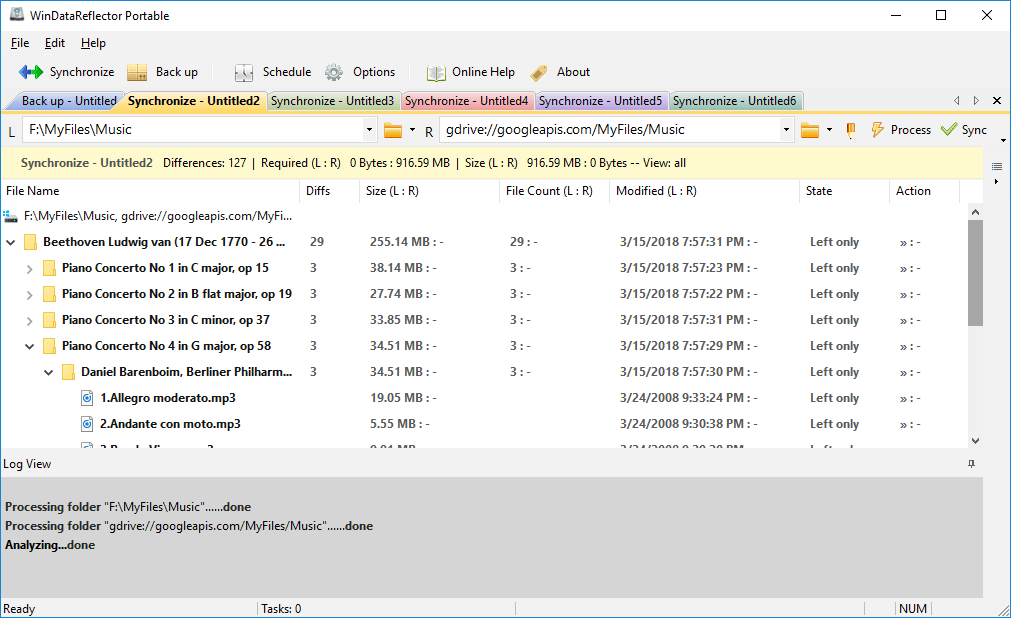
WinDataReflector 是一款轻量级的文件同步与备份工具。它体积小巧,界面简洁直观,核心优势在于将高效的文件对比与传输算法融入到可视化的操作中。
该软件适合个人用户或企业用于管理本地、网络共享及云端之间的数据,主要解决数据备份、多端同步以及防误删等核心诉求。
File size: 3.2 MB
WinDataReflector is a lightweight file synchronization and backup tool that wraps up fast file comparison and transfer algorithms into a simple and clear interface that offers you visual comparison of files and folders before synchronizing and backing them up and support for two way synchronization with fully customizable rules.
Key Features
Supports synchronizing to major cloud services, SFTP and FTP
WinDataReflector supports synchronizing files and data to Google Drive, DropBox, OneDrive, FTP and SFTP. It can sync files between a local folder or network share and a cloud folder or two cloud folders.
Two way synchronization with fully customizable rules
Changes made to either left or right folder are mirrored to the other folder making them identical and you can also configure WinDataReflector to only propagate certain changes.
Automatic synchronization and backup with built in scheduler
Schedule any task to run automatically at certain times of day or days of week and at specific intervals.
Automatic synchronization of USB flash drives and external hard disks
Recognize external hard disks and flash drives by volume label, regardless of drive letter, and optionally start backup and synchronization tasks automatically whenever a flash drive or external disk is connected to the computer.
Real time synchronization and backup
Always keep files updated with real time synchronization. WinDataReflector can replicate any changes in synchronized folders in real time.
Run multiple tasks simultaneously in tabs
View and run several tasks at the same time in separate tabs.
File and folder filtering using Regular Expressions or regular search
Exclude any directory, file name, file extension or exclude files that match regular expressions on the exclusion list.
Support for NTFS file permissions (ACLs/DACLs)
NTFS file security information and access rights can be copied to destination files and folders.
Delete options: never delete, move files to recycle bin or permanently delete files
To avoid accidental file deletion, WinDataReflector’s default configuration is set to never delete files, however, you can change it to either move deleted files to recycle bin or permanently delete files.
Keeping copies of old files before replacing them
To protect against data loss, WinDataReflector can create copies of files before replacing them with newer files.
CRC comparison and verification
In addition to timestamp and size comparisons WinDataReflector also supports using CRC (Cyclic Redundancy Check) checksums to compare files and verify their integrity after copying.
Run commands before and after tasks
Add commands to be executed before and after applying backup and synchronization tasks. Commands can include certain programs to be launched with specific command line arguments or executable batch files.
Compression support
Supports backing up files to ZIP archives in two modes: overwrite existing or create new timestamped archives for each backup.
System Requirements: Windows 7, Windows 8, Windows 10, Windows 11
百度网盘下载:
1、VIP会员仅需30元全站资源免费下载!
2、资源默认为百度网盘链接,请用浏览器打开输入提取码不要有多余空格,如无法获取 请联系微信 yunqiaonet 补发。
3、分卷压缩包资源 需全部下载后解压第一个压缩包即可,下载过程不要强制中断 建议用winrar解压或360解压缩软件解压!
4、云桥CG资源站所发布资源仅供用户自学自用,用户需以学习为目的,按需下载,严禁批量采集搬运共享资源等行为,望知悉!!!
5、云桥CG资源站,感谢您的赞赏与支持!平台所收取打赏费用仅作为平台服务器租赁及人员维护资金 费用不为素材本身费用,望理解知悉!平台资源仅供用户学习观摩使用 请下载24小时内自行删除 如需商用请支持原版作者!请知悉并遵守!
6、For international users: If you do not have a Baidu Netdisk VIP account, please contact WeChat: yunqiaonet for assistance with logging into Baidu Netdisk to download resources..











