Actual Transparent Window 8.15.4 是一款创新的Windows桌面增强工具,可为任意窗口设置自定义透明度,实现深度排序,提高多任务处理效率。适用于追求时间价值与桌面美感的用户。
原始标题:Actual Transparent Window 8.15.4 Multilingual
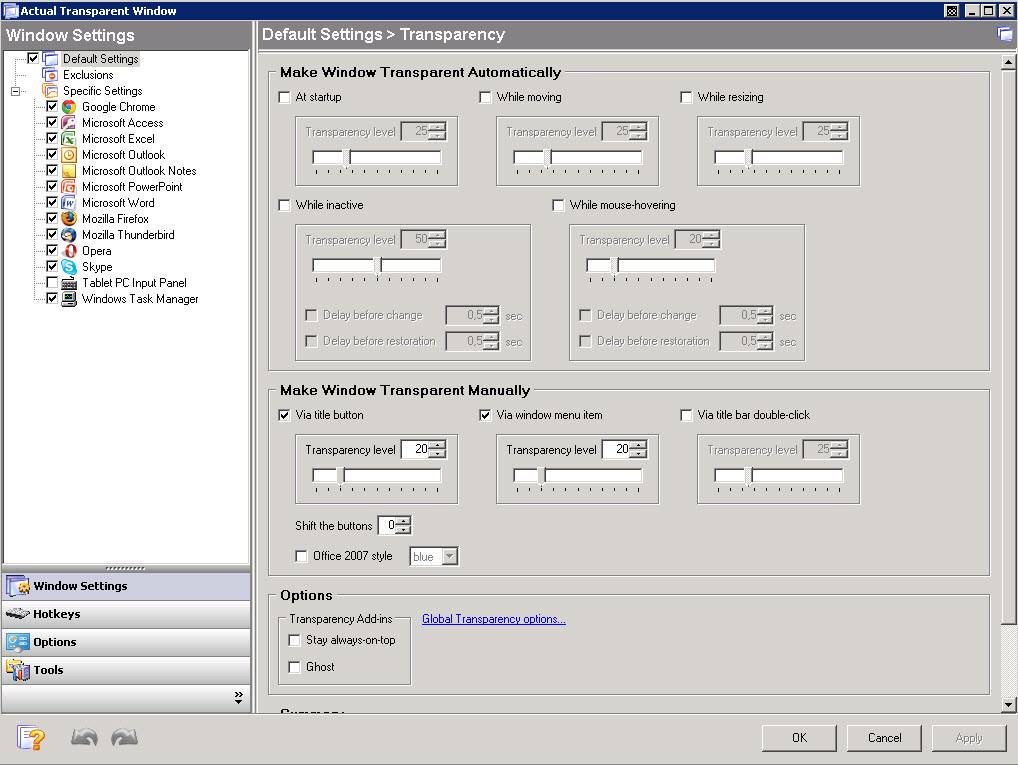
Actual Transparent Windows可以帮助你任何一个窗口增加透明效果!
Actual Transparent Window 8.x | 8.9 Mb
Actual Transparent Window is an innovative Windows® desktop enhancement which allows setting any level of transparency for any particular window in the system. With Actual Transparent Window it is very easy to organize the simultaneously opened windows. It is a truly new approach to desktop space organization. Now you do not have to minimize and restore windows every time. Along with common techniques of switching between windows Actual Transparent Window offers the depth-based window ordering thanks to a fully customizable transparency levels that are saved individually for each window. When a brilliant idea is combined with a good realization, the results are outstanding!
Actual Transparent Window is intended for a broad range of Windows® users who value their time and long for an aesthetic pleasure of modern computing. Windows® is multifunctional, and sometimes we work with several different applications. While typing something in Microsoft Word you need, for example, to follow some information in your Internet browser. Push Win+T (toggle transparency), and the desired window becomes transparent, and you will solve your task easily. Besides, usage of semi-transparent windows reduces the negative effect on your eyes!
Multiple reports of Actual Transparent Window users indicate an overall increase of productivity when using several business applications that require manual information interchange simultaneously. Desktop space, saved by the elimination of opaque windows, can be used for keeping additional icons there.
Just some features of Actual Transparent Window for you to be sure:
Individual transparency rate:
Actual Transparent Window lets you set individual transparency rate for each window. You can change transparency from 0% (solid) to 100% (fully transparent) to achieve the desired effect.
Inactive window transparency:
Actual Transparent Window has option to set transparency only when window becomes inactive. And when you activate this window it becomes non-transparent again. This option may be especially useful for your instant messenger (ICQ, Windows Messenger, Yahoo! Messenger or any other).
Ghost mode:
You can also activate the ghost mode. In this case all mouse clicks and moves to be made through the transparent window to underlying windows.
Apply transparency effect while window is moved or is resized:
Apply transparency effect only when you move/drag or resize the window across the desktop. Note that this does not affect your transparency setting for windows while they are not being moved or resized.
Toggle transparency\opaque window state by double click on title bar:
To toggle a window from transparent to opaque, double-click the title bar. To toggle a window from opaque to transparent, double-click the title bar again.
“Make Transparent” button:
The new “Make Transparent” button is may be added to a window title bar. Now you can switch the semi-transparency on/off just by pressing it.
You can select a different transparency level for any window on-the-fly, while it is open! Right-click the “Make Transparent” title button to display its context menu where you can choose one of the predefined transparency levels. It’s a very gorgeous effect, try it – and you’ll like it very much!
Multilingual support:
Actual Transparent Window is available in English, German, French, Spanish, Russian, Ukrainian, Japanese, Chinese Simplified and Chinese Traditional languages.
官方网站:http://www.actualtools.com/transparentwindow/
此处内容需要权限查看
会员免费查看1、VIP会员仅需30元全站资源免费下载!
2、资源默认为百度网盘链接,请用浏览器打开输入提取码不要有多余空格,如无法获取 请联系微信 yunqiaonet 补发。
3、分卷压缩包资源 需全部下载后解压第一个压缩包即可,下载过程不要强制中断 建议用winrar解压或360解压缩软件解压!
4、云桥CG资源站所发布资源仅供用户自学自用,用户需以学习为目的,按需下载,严禁批量采集搬运共享资源等行为,望知悉!!!
5、云桥CG资源站,感谢您的赞赏与支持!平台所收取打赏费用仅作为平台服务器租赁及人员维护资金 费用不为素材本身费用,望理解知悉!平台资源仅供用户学习观摩使用 请下载24小时内自行删除 如需商用请支持原版作者!请知悉并遵守!
6、For international users: If you do not have a Baidu Netdisk VIP account, please contact WeChat: yunqiaonet for assistance with logging into Baidu Netdisk to download resources..