

CoolUtils Total Image Converter 是一款高效的图片批量转换软件,支持超过30种格式,包括RAW、TIFF、JPEG等,具备裁剪、调整大小、添加水印和旋转功能。适合网页图像优化和旧照片恢复,批量处理省时省力。
原始标题:CoolUtils Total Image Converter 8.5.0.338 Multilingual 图片批量转换
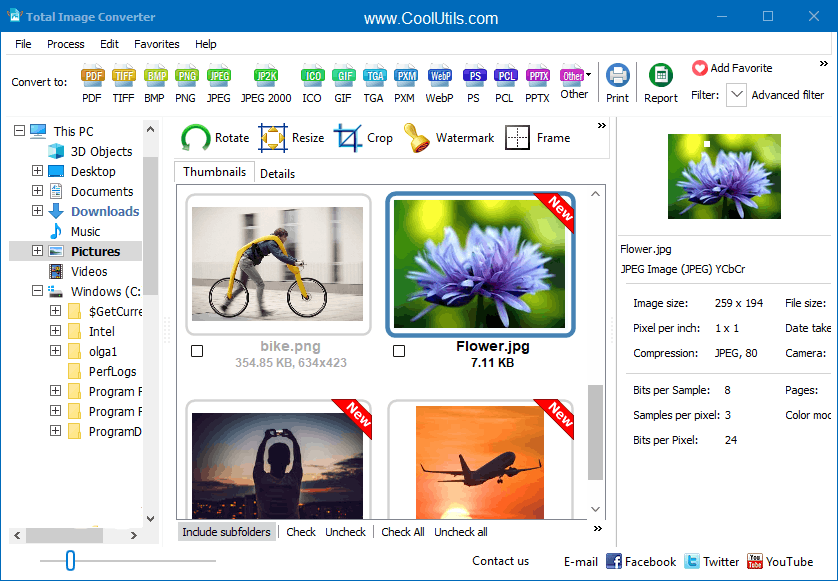
一款操作简便的图片格式批量转换软件。该软件支持TIFF, JPEG, PSD, RAW (CRW, CR2, NEF, PEF, RAF, X3F, ORF, MRW), PNG, BMP, PSD, TGA 等图片格式,支持裁剪、调整大小、添加水印和旋转功能。他最大的特点就是帮助用户进行转换图片格式了,将大型TIFF转换为小型JPEG,支持超过30种支持的格式 ,可批量调整大小,可批量转换图像或RAW照片并获得最高质量。 压缩您网站的图像,使照片适合网络或以不支持的格式恢复旧照片,小JPEG中,你可以把大的TIFF图像转换成一个网页尺寸,或者将原始照片转化为原始照片。
Total Image Converter converts images to other formats, crops, resizes and rotates them. Convert large TIFFs into small JPEGs, make photos suitable for the web or recover old photos in unsupported formats – Total Image Converter will do everything you need.
Here are some key features:
· All image formats
· Total Image Converter supports almost all image formats (see the list ->). It’s all-in-one solution for those who do not want to waste time and effort searching for 10 different converters to deal with different formats.
· Batch conversion
· If you have hundreds of images to be converted, you can use its batch file convert option. Just check the files that you want to process or just press Select All button to save your time. Get any amount of image files converted or resized in one click!
· 3 ways of handling
· First, there is well-thought user interface. Second, Total Image Converter seamlessly integrates into Windows. That means that you may select the file in your desktop and make right-button mouse click. You will see ConvertTo item in the standart Windows popup menu. And there is also Command line support. Run Total Image Converter from the command line within other programs.
· Built-in viewer and thumbnails
· Total Image Converter has built-in viewer. You may easily view your images inside the program before or after the conversion. You can either work with detailed list of files (name, size, type, modify, attributes) or with their thumbnails.
· Resize, rotate, crop, mirror
· With Total Image Converter you can also resize, crop, rotate or mirror images and change the color resolution (include convert to black and white color) of your graphics. Besides, you may adjust White Balance and make gamma correction. Adjust or set Brightness, Contrast or Saturation, apply shadow or use some filter. All this done when converting your image with Total Image Converter!
· Watermarking
· Total Image Converter lets you apply watermarks to your images! You may add your comment, logo or date to a single photo or a bunch of them.
· No special knowledge required
· Even if you never dealt with image converters before you will master the program in seconds. The program will itself ask you all the questions about the conversion settings and in case you are at a loss it will advise you the best setting for each conversion. Click here to make a quick tour on the program and see how simple it is to use it.
Whats New:
Updates: official site does not provide any info about changes in this version
此处内容需要权限查看
会员免费查看1、VIP会员仅需30元全站资源免费下载!
2、资源默认为百度网盘链接,请用浏览器打开输入提取码不要有多余空格,如无法获取 请联系微信 yunqiaonet 补发。
3、分卷压缩包资源 需全部下载后解压第一个压缩包即可,下载过程不要强制中断 建议用winrar解压或360解压缩软件解压!
4、云桥CG资源站所发布资源仅供用户自学自用,用户需以学习为目的,按需下载,严禁批量采集搬运共享资源等行为,望知悉!!!
5、云桥CG资源站,感谢您的赞赏与支持!平台所收取打赏费用仅作为平台服务器租赁及人员维护资金 费用不为素材本身费用,望理解知悉!平台资源仅供用户学习观摩使用 请下载24小时内自行删除 如需商用请支持原版作者!请知悉并遵守!
6、For international users: If you do not have a Baidu Netdisk VIP account, please contact WeChat: yunqiaonet for assistance with logging into Baidu Netdisk to download resources..











