

VideoMeld 1.84 x64是一款多轨音视频编辑软件,支持高清视频与8声道音频,内置50多种特效、过渡和合成功能,可混音、加字幕、录屏,适合制作教程、YouTube视频及专业演示。
原始标题:VideoMeld 1.84 x64
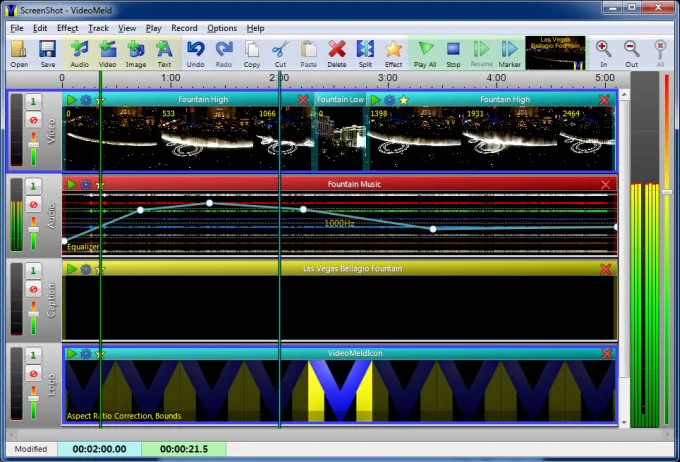
VideoMeld是一个全新的多轨数字音频和视频编辑程序。 VideoMeld拥有在同类产品中最先进的特效编辑器之一。 在同一时间,创建令人难以置信的各种效果可应用于许多。 精确详细的动画视觉效果,随着时间的推移,效果设置,可以改变。
使用它可以 :
– 混合在一起,任何数量的音频和视频文件到一个单一的文件
– 创建令人印象深刻的演示或配有背景音乐,照片和视频教程
– 编辑视频,添加文字说明,特殊效果和过渡
– 创建具有专业外观的YouTube视频
– 主音乐录音,乐器和人声保持单独的音轨
– 录像的电脑屏幕(screencasting)的,理想的软件培训视频或示威
VideoMeld功能包括 :
– 高品质的高清视频高达1920×1080,并保存为MPEG-4 H.264
– 高品质8声道音频(7.1环绕声)
– 超过50个视频特效,过渡和合成功能
– 7音频效果,包括降噪,压缩器/扩展,均衡器,间距
– 功能强大! 所有的音频和视频效果的动态效果设置
– 滚动字幕币或行情
的 – Screencasting记录视频直接从电脑屏幕上
Windows 7或更高版本是必需的 。
VideoMeld |6.2 MB
VideoMeld is an all new multitrack digital audio and video editing program. VideoMeld has one of the most advanced effects editors in its class. Many effects can be applied at the same time, creating incredible variety. Effect settings can be varied precisely over time for detailed animated visuals.
Use it to:
– Mix together any number of audio and video files into a single file
– Create impressive presentations or tutorials with background music, photos, and video
– Edit videos and add text captions, special effects, and transitions
– Create professional looking YouTube videos
– Master music recordings, keeping instrument and vocal tracks separate
– Make video recordings of the computer screen (screencasting), ideal for software training videos or demonstrations
VideoMeld features include:
– High quality HD video up to 1920×1080 and save as MPEG 4 H.264
– High quality 8 channel audio (7.1 surround sound)
– Over 50 video effects, transitions, and compositing functions
– 7 audio effects including Noise Reduction, Compressor/Expander, Equalizer, and Pitch
– Powerful! dynamic effect settings for all audio and video effects
– Scrolling captions for credits or tickers
– Screencasting records video directly from the computer screen
Windows 7 or later is required. This software uses features not found in older versions of Windows.
官方网站:http://goldwave.com/
此处内容需要权限查看
会员免费查看1、VIP会员仅需30元全站资源免费下载!
2、资源默认为百度网盘链接,请用浏览器打开输入提取码不要有多余空格,如无法获取 请联系微信 yunqiaonet 补发。
3、分卷压缩包资源 需全部下载后解压第一个压缩包即可,下载过程不要强制中断 建议用winrar解压或360解压缩软件解压!
4、云桥CG资源站所发布资源仅供用户自学自用,用户需以学习为目的,按需下载,严禁批量采集搬运共享资源等行为,望知悉!!!
5、云桥CG资源站,感谢您的赞赏与支持!平台所收取打赏费用仅作为平台服务器租赁及人员维护资金 费用不为素材本身费用,望理解知悉!平台资源仅供用户学习观摩使用 请下载24小时内自行删除 如需商用请支持原版作者!请知悉并遵守!
6、For international users: If you do not have a Baidu Netdisk VIP account, please contact WeChat: yunqiaonet for assistance with logging into Baidu Netdisk to download resources..











