Mac效率神器Bloom 1.5.34,彻底替代Finder
Bloom 1.5.34 MacOS版是Finder的理想替代工具,提供全局快速跳转、关键字秒搜文件及实时搜索结果刷新,助你高效整理和定位文件,全面提升工作流效率。
File Size: 15.4 MB
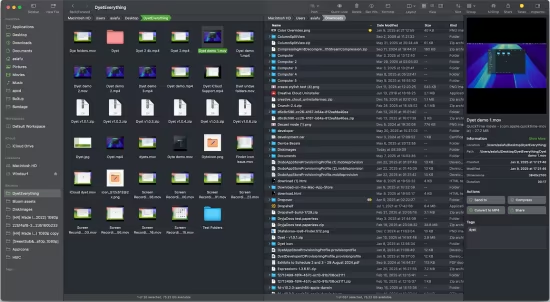
Refined Finder Experience, Reimagined for Productivity. The finest replacement for Finder with powerful tools to streamline your workflow, enhance productivity, and keep everything organized at your fingertips.
Better Search Experience
Bloom brings “Go to Folder” system-wide with an intuitive shortcut ⌘⇧⏎, so you can navigate to any location instantly, from anywhere.
Search Files by Keyword
Actually the panel supports both path navigation and keyword search. When you enter keywords, Bloom searches exclusively within your predefined locations (by default, ~). It can scan tens of thousands of files in seconds, delivering lightning-fast results.
Search Where You Work
With Bloom, you can search right where you are—just press ⌘F in any folder and start typing. The search is live, so any changes you make to the file system appear instantly. You can also use ⌘R to manually refresh the search results.
Portal
Portal is a compact Bloom window without the sidebar or preview. Though it looks small, it offers all the core features of a standard window. Use it to open your working directory or as a temporary transfer station. You can pin it on top of other windows, and when dragged to the edge of the screen, it will automatically collapse into the edge.
View Archives
Bloom supports viewing archive contents without extracting them. You can browse the compressed file structure in the inspector, just like a regular file preview. For text/image/PDF entries under 10MB, you can even press «Space» or double-click to open them directly.
Sync Browsing
After enabling this in the toolbar, as you navigate through the folder list on the left panel, the contents of the selected directory are automatically displayed in the right panel. This makes it easier to browse your files without switching context.
Column Auto Resize
Bloom is dedicated to optimizing the file-browsing experience, and this takes it to the next level. With Auto Resize enabled, you no longer need to tweak the name column or adjust the column width in column view to see full file names.
Why Settle for White and Gray?
Tired of Finder’s one-size-fits-all gray or white? In Bloom, you are the one who sets the tone. Pick your favorite color and Bloom will style the interface to match it beautifully, keeping everything balanced and cohesive.
And More…
此处内容需要权限查看
会员免费查看1、VIP会员仅需30元全站资源免费下载!
2、资源默认为百度网盘链接,请用浏览器打开输入提取码不要有多余空格,如无法获取 请联系微信 yunqiaonet 补发。
3、分卷压缩包资源 需全部下载后解压第一个压缩包即可,下载过程不要强制中断 建议用winrar解压或360解压缩软件解压!
4、云桥CG资源站所发布资源仅供用户自学自用,用户需以学习为目的,按需下载,严禁批量采集搬运共享资源等行为,望知悉!!!
5、云桥CG资源站,感谢您的赞赏与支持!平台所收取打赏费用仅作为平台服务器租赁及人员维护资金 费用不为素材本身费用,望理解知悉!平台资源仅供用户学习观摩使用 请下载24小时内自行删除 如需商用请支持原版作者!请知悉并遵守!
6、For international users: If you do not have a Baidu Netdisk VIP account, please contact WeChat: yunqiaonet for assistance with logging into Baidu Netdisk to download resources..