

Radiant Photo是一款由Perfectly Clear Engine驱动的AI图像增强软件,智能识别场景和像素,提供渐变滤镜、人像优化、色彩分级等专业工具,快速输出高质量照片,适用于Windows x64系统。
原始标题:Radiant Photo 2.2.1.1042 Multilingual
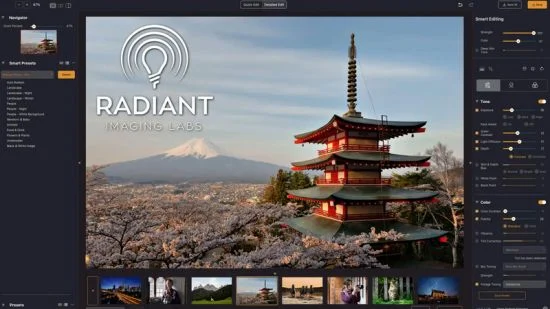
一款领先的数字照片增强和编辑工具。由Perfectly Clear Engine提供支持的下一代图像编辑,AI识别照片的内容,并分析每个像素并选择理想的起点。提供智能预设,开始编辑将应用于我们收藏的照片,或使用您自己的 AI预设。智能工具会自动适应每张照片。
Windows x64 | Addons | File size: 246.02 MB
Your photos deserve to be radiant. Get superior quality finished photos with perfect color rendition, delivered to you in record time. Your photos — simply RADIANT. The way they are meant to be.
Amazing images. No sweat.
Getting great results with Radiant Photo couldn’t be easier!
The Radiant Photo image pipeline — Enhancement Tools
– Graduated Filter
A linear or a radial gradient can apply adjustments to only part of your image.
– Portrait Tools
Enhance the beauty of your subject with natural edits that enhance eyes, skin, and much more.
– Color Grading
LOOKs offer intelligent style recipes for your photos. Quickly editable for a personal style.
– Finishing Tools
Fine-tuning adjustments that can be applied last in the image pipeline.
The Radiant Photo image pipeline — Quick Edit
– Scene Detection
AI recognizes the content of the photo, as well as analyzes each pixel and chooses the ideal starting point.
– Smart Presets
A starting edit is applied to the photo from our collection, or use your own AI presets. Smart tools automatically adapt to every photo.
– Quick Edit Controls
Refine the edit quickly with seven essential controls – for most, the image is ready to print or share.
The Radiant Photo image pipeline — Detailed Edit
– Radiant Tone
Enhance the dynamic range of the scene without clipping. Get perfect exposure every time.
– Radiant Color
Photo color correction that matches how the human eye sees color — true to life.
– Radiant Details
Enhance sharpness, reveal lost details, and eliminate noise with smart tools. The Radiant Photo image pipeline — Enhancement Tools
System requirements
Hardware: Windows-based hardware PC with mouse or similar input device
Processor: CPU Intel® Core™ i5 or better
OS version: Windows® 10 or Windows® 11 (64-bit editions)
RAM: 8 GB RAM or more (minimum) / 16+ GB RAM (recommended)
Disk space: 1 GB free space; SSD for best performance
Display: 1280 x 800 display (minimum) / 1920 x 1080 display (recommend)
Plugin hosts: Photoshop CS6 or Photoshop Creative Cloud, Lightroom 6 or Lightroom Classic, Corel PaintShop Pro X6, X7, X8, or X9 V22
官方网站:https://radiantimaginglabs.com/
此处内容需要权限查看
会员免费查看1、VIP会员仅需30元全站资源免费下载!
2、资源默认为百度网盘链接,请用浏览器打开输入提取码不要有多余空格,如无法获取 请联系微信 yunqiaonet 补发。
3、分卷压缩包资源 需全部下载后解压第一个压缩包即可,下载过程不要强制中断 建议用winrar解压或360解压缩软件解压!
4、云桥CG资源站所发布资源仅供用户自学自用,用户需以学习为目的,按需下载,严禁批量采集搬运共享资源等行为,望知悉!!!
5、云桥CG资源站,感谢您的赞赏与支持!平台所收取打赏费用仅作为平台服务器租赁及人员维护资金 费用不为素材本身费用,望理解知悉!平台资源仅供用户学习观摩使用 请下载24小时内自行删除 如需商用请支持原版作者!请知悉并遵守!
6、For international users: If you do not have a Baidu Netdisk VIP account, please contact WeChat: yunqiaonet for assistance with logging into Baidu Netdisk to download resources..











