

Remo Recover Windows 6.1.0.8是一款专业数据恢复软件,可轻松恢复误删、格式化、分区丢失等文件,支持超过300种类型,适合所有Windows用户。
原始标题:Remo Recover Windows 6.1.0.8
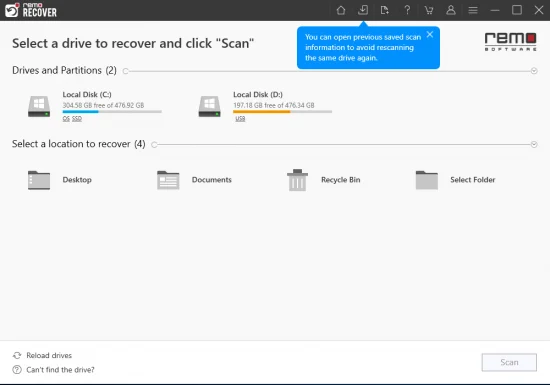
Remo Recover Windows 解决了所有Windows用户的数据恢复故障。该软件提供了简单的数据丢失的恢复,如清空Windows回收站,删除文件的数据恢复。此外,它具有惊人的能力从复杂数据丢失的情况下,如意外重新安装的Windows ,删除的文件/ RAID驱动器的分区,重新格式化分区或重新分区的硬盘驱动器恢复数据。
Windows x86/x64 | File size: 57.90 MB
Remo Recover (Windows) is the best solution to recover your deleted or lost data in an easy way. Data lost due to emptying Recycle Bin, formatting, corrupt partitions, accidental deletion using Shift + Delete keys or due to any other reason will be recovered. With its friendly interface, even a non-tech savvy user can recover data without any hindrances.
Remo Data Recovery software is designed with strong scanning mechanisms that helps in restoring data lost even in complex data loss situations like improper partitioning, unbootable drives, after OS reinstallation etc. You might have lost your text documents, spreadsheets, PowerPoint presentations, pictures, videos, RAW images, PDFs, EXE files etc., the software restored them all back, and actually it can restore more than 300 types of files.
Key Features
– Deleted file recovery, even after using “Shift+Del”
– Recover files Emptied from recycle bin
– Choose and recover variety of files using Raw search
– Recover professional RAW Photo files
– Recover photos, videos and music files
– Create disk images to skip bad sectors
– Recover data from disk images created using Remo Recover
– Recover data after Windows Re-Installation
– Add new file types for recovery using Raw Signature Search
– Recover data from accidentally formatted, re-formatted partitions
– Recover data from lost / deleted partitions
– Recover data from re-partitioned drives
Benefits of Remo Data Recovery Software
– Quick and easy recovery of all sorts of data in simple steps
– Scans complete drive in few minutes to recover deleted / lost data
– Recovers files bypassing Windows recycle bin when they exceed in size as compared to the recycle bin, files deleted using Shift + Delete or when deleted from Windows command prompt as well
– Rescue files from formatted partitions, even after re-installing Windows OS
– Complete hard drive data recovery when drive is crashed or does not boot
– Gets data back from partitions, which are either deleted, lost, inaccessible or missing due to partitioning errors
– Recover deleted files, data from formatted partitions and deleted / corrupt partitions from a RAID0, RAID1 and RAID5 array
– Ability to identify all file types including office files, photos, audio, video and other important file types on the basis of their unique signatures and recovers them using signature search with ease
– Recovered data can be sorted on the basis of name, date, size and file type
– Recover data from hard drives (SATA / SCSI / IDE etc.), flash memory cards (SD, XD, MMC, Memory Stick etc.), USB external drives, FireWire Drives
– Supports recovery of data from FAT16, FAT32, NTFS, NTFS5, ExtFAT formatted partitions/drives
– You can resume the recovery / saving process any time using “Save Scan Information” feature, this ensures that you need not to rescan your drive to locate lost data
– Create Disk Images to bypass bad sectors, you can later recover data from these disk images
此处内容需要权限查看
会员免费查看1、VIP会员仅需30元全站资源免费下载!
2、资源默认为百度网盘链接,请用浏览器打开输入提取码不要有多余空格,如无法获取 请联系微信 yunqiaonet 补发。
3、分卷压缩包资源 需全部下载后解压第一个压缩包即可,下载过程不要强制中断 建议用winrar解压或360解压缩软件解压!
4、云桥CG资源站所发布资源仅供用户自学自用,用户需以学习为目的,按需下载,严禁批量采集搬运共享资源等行为,望知悉!!!
5、云桥CG资源站,感谢您的赞赏与支持!平台所收取打赏费用仅作为平台服务器租赁及人员维护资金 费用不为素材本身费用,望理解知悉!平台资源仅供用户学习观摩使用 请下载24小时内自行删除 如需商用请支持原版作者!请知悉并遵守!
6、For international users: If you do not have a Baidu Netdisk VIP account, please contact WeChat: yunqiaonet for assistance with logging into Baidu Netdisk to download resources..











