

uBar 4.2.6是一款Mac平台的Windows风格窗口切换工具,可替代系统Dock,提供类似Windows 7的任务栏体验,显示日期时间与日历,帮助Windows转Mac用户快速适应,实现平稳过渡。
原始标题:uBar 4.2.6 MacOSX
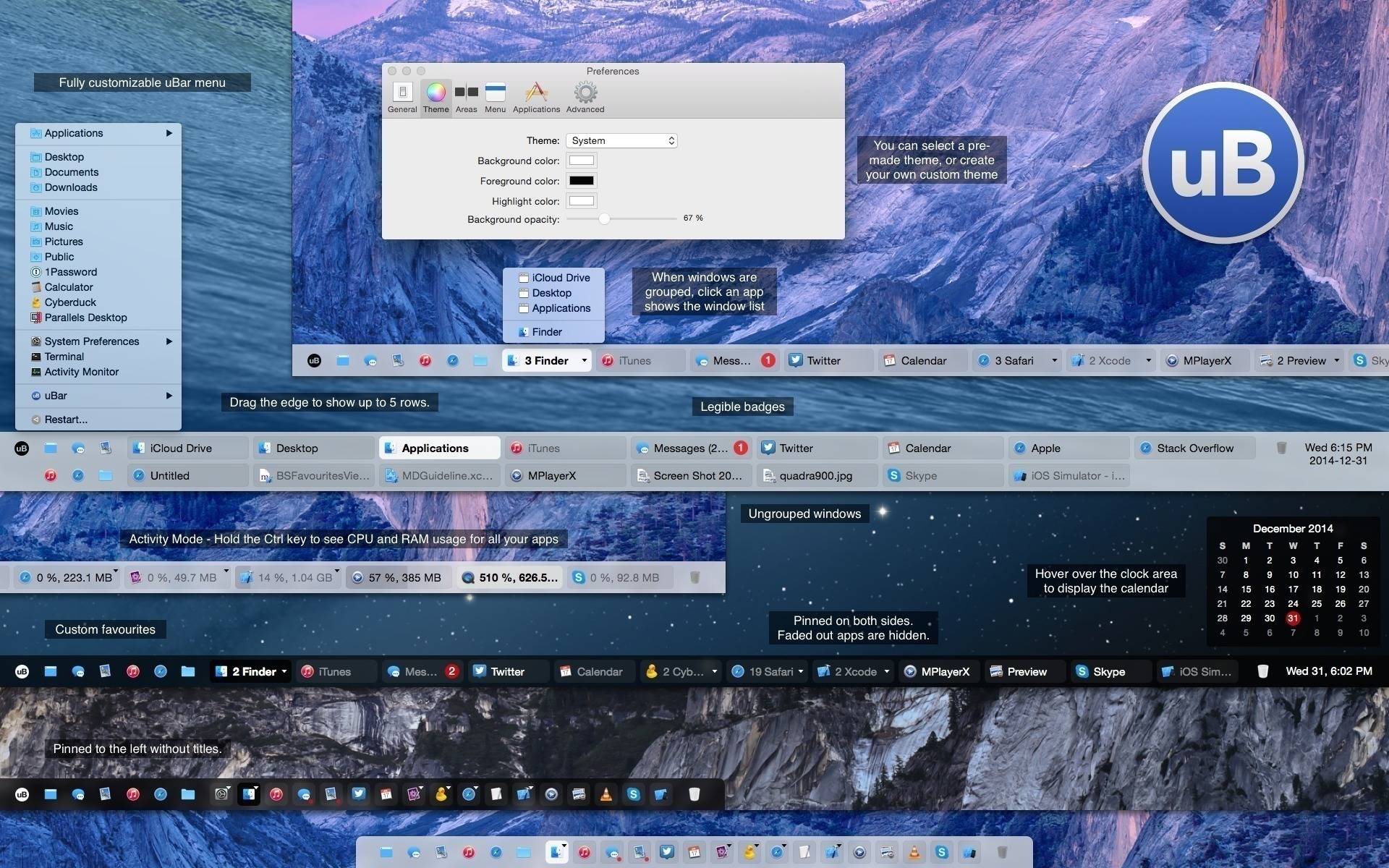
uBar是一款适用于Mac操作系统的软件。软件介绍这是一款Mac平台的windows风格窗口切换工具,bar可以很方便的帮助用户从OS X系统使用到windows系统风格的任务窗口工具。如果你从Windows切换到Mac不能适应任务窗口,那不妨试试这个 UBAR,能够帮助我们从Windows世界到Mac的平稳过渡。
uBar – is a complete replacement for the standard Dock in OS X. The appearance, job applications and its capabilities much closer to those from Windows. When you first start the program you want to allow it access to the settings menu “Privacy” in the security settings and security. After that you need to restart the application. Now look at the bottom of the workspace, where the Dock by default. However, it will be seen, another panel, strongly resemble those of some of Windows 7.
Now, those who have recently moved to the “Wind” will be much more comfortable, because all the elements are in the usual place. In the lower right corner displays the date and time. When you hover the mouse cursor in the pop-up window will show the calendar and when you click on the area – open the corresponding application. In the lower left corner – the analogue of “Start” button that opens a menu of the program are divided into categories, standard folders, system settings and the ability to shutdown, reboot and exit from your account. Between them – open the active window, a hair’s breadth as an operating system from Microsoft.
Features
Favourites area (including Show Desktop and Trash)
Expands up to 5 rows (by dragging the edge)
Application Badges are readable unlike the Dock’s
Customizable uBar menu
Activity Mode: hold Ctrl key to show Application CPU and Memory usage
Group Windows by Application (Always, Never, Automatic)
Light or Dark theme
What’s New in version 4.0.1:
[New] Option to exclude apps with zero windows is added to the Apps preference pane
[Fixed] Auto-resize now works on multi-monitor setups with rotated screens
[Fixed] Tooltips display for active favorites
[Fixed] Folder favorites now show sub-items in Finder
[Fixed] Steam now displays icon and toggles with zero windows
[Fixed] Zip files no longer listed as folders
[Fixed] Opening or emptying the trash now occurs in the background
官方网站:https://brawersoftware.com/products/ubar
此处内容需要权限查看
会员免费查看1、VIP会员仅需30元全站资源免费下载!
2、资源默认为百度网盘链接,请用浏览器打开输入提取码不要有多余空格,如无法获取 请联系微信 yunqiaonet 补发。
3、分卷压缩包资源 需全部下载后解压第一个压缩包即可,下载过程不要强制中断 建议用winrar解压或360解压缩软件解压!
4、云桥CG资源站所发布资源仅供用户自学自用,用户需以学习为目的,按需下载,严禁批量采集搬运共享资源等行为,望知悉!!!
5、云桥CG资源站,感谢您的赞赏与支持!平台所收取打赏费用仅作为平台服务器租赁及人员维护资金 费用不为素材本身费用,望理解知悉!平台资源仅供用户学习观摩使用 请下载24小时内自行删除 如需商用请支持原版作者!请知悉并遵守!
6、For international users: If you do not have a Baidu Netdisk VIP account, please contact WeChat: yunqiaonet for assistance with logging into Baidu Netdisk to download resources..











