FastStone Capture 11.3 是一款经典高效的屏幕截图与录制软件,支持全屏、窗口、滚动截图及多种图片格式,集图像编辑和视频录制于一体,是办公与创作必备工具。
原始标题:FastStone Capture 11.3 Multilingual
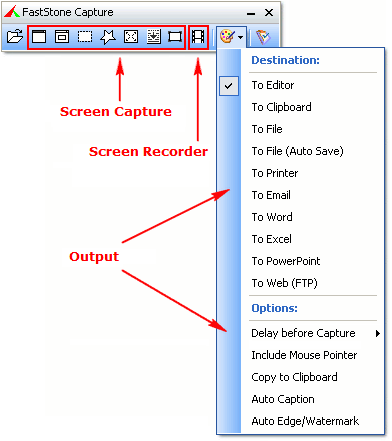
FastStone Capture (FSCapture) 是经典好用的屏幕截图软件,还具有图像编辑和屏幕录制两大功能,可以捕捉全屏图像,或者活动窗口、窗口内的控件对象截图、支持手绘区域自由截图,或者滚动窗口等等,支持所有主流图片格式。
FastStone 捕获可保存为 BMP、GIF、JPEG、PCX、PNG、TGA、TIFF 和 PDF 格式的文件。
FastStone Capture (FSCapture) 是经典好用的屏幕截图软件,还具有图像编辑和屏幕录制两大功能,可以捕捉全屏图像,或者活动窗口、窗口内的控件对象截图、支持手绘区域自由截图,或者滚动窗口等等,支持所有主流图片格式。
FastStone 捕获可保存为 BMP、GIF、JPEG、PCX、PNG、TGA、TIFF 和 PDF 格式的文件。
File size: 8.8 MB
FastStone Capture is a powerful, lightweight, yet full-featured screen capture tool and screen video recorder. It allows you to easily capture and annotate anything on the screen including windows, objects, menus, full screen, rectangular / freehand / fixed regions as well as scrolling windows / web pages. It also allows you to record all screen activities including onscreen changes, speech from microphone, mouse movements and clicks into highly compressed video files. You can choose to send captures to editor, file, clipboard, printer, email, Word / PowerPoint document or upload them to your website.
Editing tools include annotating (texts, arrowed lines, highlights), resizing, cropping, sharpening, watermarking, applying edge effects and many more. Other features include image scanning, global hotkeys, automatic filename generation, support for external editors, a color picker, a screen magnifier, a screen crosshair and a screen ruler. FastStone Capture saves images in BMP, GIF, JPEG, PCX, PNG, TGA, TIFF and PDF formats. Built-in screen recorder saves videos in WMV (Windows Media Video) format.
此处内容需要权限查看
会员免费查看1、VIP会员仅需30元全站资源免费下载!
2、资源默认为百度网盘链接,请用浏览器打开输入提取码不要有多余空格,如无法获取 请联系微信 yunqiaonet 补发。
3、分卷压缩包资源 需全部下载后解压第一个压缩包即可,下载过程不要强制中断 建议用winrar解压或360解压缩软件解压!
4、云桥CG资源站所发布资源仅供用户自学自用,用户需以学习为目的,按需下载,严禁批量采集搬运共享资源等行为,望知悉!!!
5、云桥CG资源站,感谢您的赞赏与支持!平台所收取打赏费用仅作为平台服务器租赁及人员维护资金 费用不为素材本身费用,望理解知悉!平台资源仅供用户学习观摩使用 请下载24小时内自行删除 如需商用请支持原版作者!请知悉并遵守!
6、For international users: If you do not have a Baidu Netdisk VIP account, please contact WeChat: yunqiaonet for assistance with logging into Baidu Netdisk to download resources..