

Quite Imposing Plus v6.1b是专为Acrobat打造的PDF拼版插件,支持折手、裁切、批处理自动化等功能,兼容DC等版本,适合印刷及出版专业人士。
原始标题:Quite Imposing Plus v6.1b x64
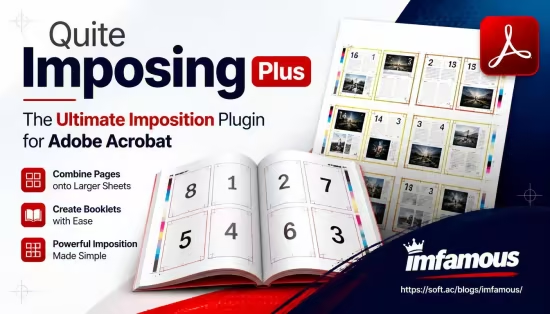
Quite Imposing Plus 是由英国 Quite Software 公司开发、专用于 Adobe Acrobat 的一款强大且业界普及率极高的 PDF 拼版与印前处理插件。它专门为印刷厂、文印店、快印中心以及出版专业人士设计。
- 页面重新排序与拆分:支持对 PDF 文件的页面进行重新排序、奇偶页分离、合并、删除、旋转以及插入空白页等操作。
- 专业折手与拼版(Imposition):支持骑马订、胶装、册页、单面/双面N合一等多种折手方式,能轻松将散页拼成符合印刷装订要求的版面。
- 裁切与出血设置:可为页面添加角线(裁切线)、中心线、色彩测试条以及自定义的页眉、页码和日期。
- 自动化批处理(Imposition Control Sequences):支持将常用的复杂拼版步骤录制并保存为“控制序列”,实现一键自动化全书拼版,大幅减少人工重复劳动并降低出错率。
- 软件兼容性:完美兼容主流的 Adobe Acrobat 版本(如 Acrobat DC、XI、X、9 等)。
WiN x64 | Acrobat DC | File size: 20 MB
Quite Imposing Plus is a plug-in for Adobe’s Acrobat DC and older versions. It does…Imposing. This is all about combining pages onto larger sheets to make books, booklets, or special arrangements. Creating booklets or arranging complex imposition layouts has never been easier and all without leaving Acrobat!
Feature | Description
Acrobat plug-in | Runs as an extension to Adobe Acrobat
Standalone | Watched folder and command line. Suitable for server use (single location, not internet).
Enfocus Switch integration | Use in Enfocus Switch workflows.
N-up Pages | Arrange consecutive pages on a larger sheet e.g. 2×2
Step & repeat | Fills sheets with multiple copies of the same page (e.g. for business cards, labels). In V6, rotate pages if more will fit.
Variable data | Add text or graphics according to a data source (e.g. CSV)
Trim & Shift | Deal with “creep” in a folded booklet, or add space, shift contents or trim from the edges
Shuffle Pages | Shuffle for cut stacks and other layouts by defining a simple rule (called a “signature”).
Shuffle Even/Odd | Process even/odd pages separately. Split into separate files and merge together († not Quite HOT)
Split/merge (partials) | Split a file and run different commands on the parts. Rejoin or create separate files. Limit 9 unsaved files in Quite Imposing Plus, unlimited in Quite Hot Imposing.
Shuffle Assistant | An easy aid to working out layout signatures
Adjust Page Sizes | Scale, crop or extend pages with optional rotation
Page Tools | Duplicate pages quickly. Also delete, move, rotate.
Tile Pages | Split pages for printing or to split spreads; can make overlap or bleed.
Reverse Pages | Reverses the order of pages
Insert Blank Pages | Inserts blank pages or creates a blank document
Insert File Pages | Insert pages from a file; easy duplication with or without collation
Insert conditionally | Insert pages until a condition is met, like “multiple of 4 pages”
Impose Annotations & Form Fields | Options to discard or convert to part of the imposition
Create Sample Document | Useful for testing layouts
Control Panel | Easy access to all functions
Custom panels | Power users can create custom panels with the commands or sequences needed.
Preferences | Define background templates with printers marks etc.
Automation Sequences | Saves a sequence of commands to use again on future impositions
Manual Imposition | Place pages over any other page at any position and scale.
Define Bleeds | Impose pages with artwork that overruns the printing edge designed to be trimmed later.
Generate bleed (V6) | Add extra content for bleed by mirroring or scaling.
PDF/X Support | PDF/X-1a and PDF/X-3, PDF/X-4 and PDF/X-5. Check the PDF/X status of a PDF file and preserve the PDF/X data in the imposition.
Stick on Text & Numbers | Add numbers and/or text to pages or imposed sheets.
Stick on fields | Stick on automatic text like file name, date, page count.
Bates Stamping | Enter numbers with a leading zero. Useful for law firms and Government agencies.
Stick on PDF Pages | Add PDF pages as graphics. Repeat one page or insert a run of pages.
Stick on Masking Tape | Define a layout for “tape”, stick on one or more pages.
Peel off Page Numbers, Masking Tape or Registration Marks | Undo “Stick on” functions, remove crop marks
Imposition Info | View origin of imposed pages for full accountability; also extract imposed pages for reuse, and delete pages from imposition.
System Requirements
Windows 10 & later
4GB RAM
此处内容需要权限查看
会员免费查看1、VIP会员仅需30元全站资源免费下载!
2、资源默认为百度网盘链接,请用浏览器打开输入提取码不要有多余空格,如无法获取 请联系微信 yunqiaonet 补发。
3、分卷压缩包资源 需全部下载后解压第一个压缩包即可,下载过程不要强制中断 建议用winrar解压或360解压缩软件解压!
4、云桥CG资源站所发布资源仅供用户自学自用,用户需以学习为目的,按需下载,严禁批量采集搬运共享资源等行为,望知悉!!!
5、云桥CG资源站,感谢您的赞赏与支持!平台所收取打赏费用仅作为平台服务器租赁及人员维护资金 费用不为素材本身费用,望理解知悉!平台资源仅供用户学习观摩使用 请下载24小时内自行删除 如需商用请支持原版作者!请知悉并遵守!
6、For international users: If you do not have a Baidu Netdisk VIP account, please contact WeChat: yunqiaonet for assistance with logging into Baidu Netdisk to download resources..











