

WiFi Scanner 2.35105.0 是Mac端强大的WiFi扫描管理工具,支持查找SSID、显示信号强度、信道规划与速度测试,助你优化无线网络配置。
原始标题:AccessAgility WiFi Scanner 2.35105.0
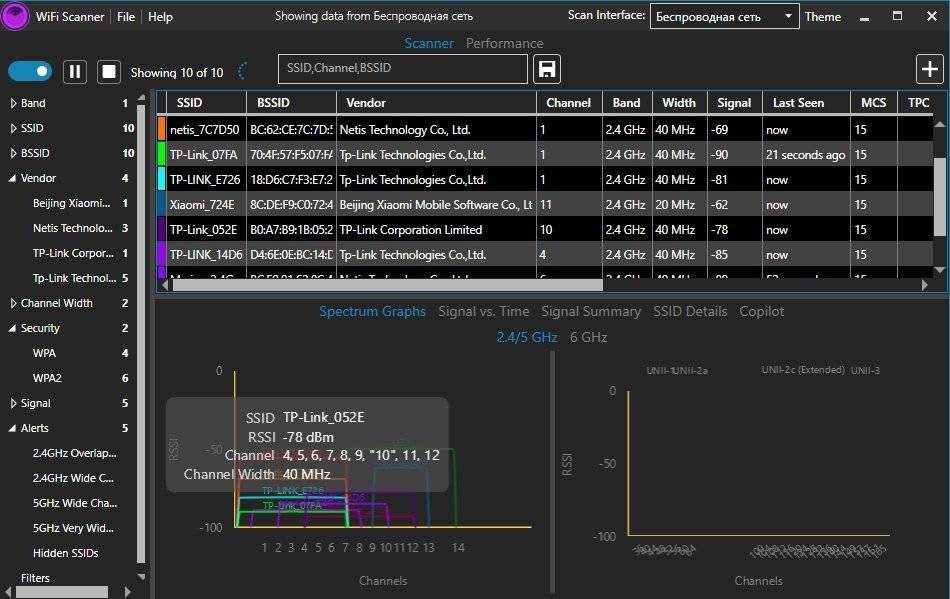
WiFi Scanner是一款Mac平台的Wifi无线网络扫描管理软件,可以查找正在广播 SSID 的接入点和客户端。它可以用于WiFi现场调查,WiFi 的发现,并连接到的无线网络。该工具可以配合BSSID/MAC地址显示以dBm为单位的信号强度。
File size: 21.57 MB
WiFi Scanner has all the tools and integrations you need for access point discovery, channel planning, speed testing, remote scanning, and packet capture analysis. Finally, a WiFi Scanner that’s both powerful and easy to use.
Simple, fast wireless network discovery of 802.11 a/b/g/n/ac/ax access points. Use WiFi Scanner to select the best configuration for your WiFi access point / router and optimize network speed.
Using WiFi Scanner you’ll see nearby wireless access points and their details, including channels, signal levels (RSSI), noise, channel width, and MAC address, signal quality, maximum data rate, encryption, and much more.wifi-scanner-mock
WiFi Scanner is great for determining the best position for an access point at home or in the office. After selecting the best position, the optimal channel to use can be determined by selecting the least used channel resulting in improved WiFi speeds.
Key Features
– Simple, fast wireless network discovery of 802.11 a/b/g/n/ac/ax access points.
– Full support for both 2.4 and 5 GHz networks (Mac OS WiFi Scanner)
– Full support for both 2.4, 5 GHz, 6 E / 6 GHZ WiFi networks (Windows WiFi Scanner using 6E adapters )
– Support for all channel bandwidths (20, 40, 80, and 160 MHz)
– Display detailed wireless network parameters: network name (SSID), signal level (RSSI), MAC address (BSSID), signal quality, channel, maximum data rate, encryption, etc.
– Display changes in signal level over time in graphical form.
– Filter list of detected wireless networks by specified parameters (SSID/network name, channel, channel band, signal strength)
– Display wireless connection statistics in the form of graphs and tables.
– Give each access point a custom label
– Export results to comma separated value (CSV) files
– Generate summary reports in HTML format
– WLAN Pi, WLAN Pi Pro, and WLAN Pi CE support as remote sensors / scanners
– Any Linux device / Raspberry Pi as remote sensors / scanners
Advanced Features (supported by some access points)
– Display access point name if configured by network administrator
– Display number of devices connected to each access point
– Display channel utilization
– Display if 802.11r is enabled and type
– Display if WiFi protection mechanisms are enabled
– 6E / 6 GHz frequency (tri-band consumer and enterprise WiFi access points and routers)
WiFi Scanner is the most feature rich and complete WiFi analyzer for Windows.
此处内容需要权限查看
会员免费查看1、VIP会员仅需30元全站资源免费下载!
2、资源默认为百度网盘链接,请用浏览器打开输入提取码不要有多余空格,如无法获取 请联系微信 yunqiaonet 补发。
3、分卷压缩包资源 需全部下载后解压第一个压缩包即可,下载过程不要强制中断 建议用winrar解压或360解压缩软件解压!
4、云桥CG资源站所发布资源仅供用户自学自用,用户需以学习为目的,按需下载,严禁批量采集搬运共享资源等行为,望知悉!!!
5、云桥CG资源站,感谢您的赞赏与支持!平台所收取打赏费用仅作为平台服务器租赁及人员维护资金 费用不为素材本身费用,望理解知悉!平台资源仅供用户学习观摩使用 请下载24小时内自行删除 如需商用请支持原版作者!请知悉并遵守!
6、For international users: If you do not have a Baidu Netdisk VIP account, please contact WeChat: yunqiaonet for assistance with logging into Baidu Netdisk to download resources..











