

Fotosizer Professional 3.24.0.596 多语言版是一款操作简便的批量图片缩放工具,支持按百分比、自定义尺寸或单边缩放快速处理数百张照片,并可统一尺寸,适合网络分享前的高效压缩与优化。
原始标题:Fotosizer Professional 3.24.0.596 Multilingual
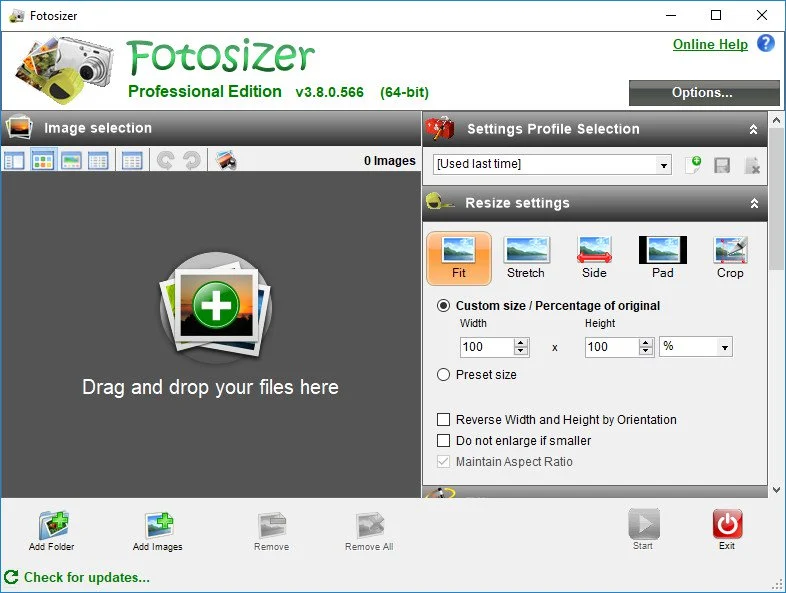
Fotosizer Professional是一款批量改变图片大小的软件,软件操作简答。
Fotosizer is a batch photo/image resizer tool. It lets you resize hundreds of photos in a matter of minutes in a quick and easy way. Increasingly, sharing photos on the internet is becoming more and more popular. Photos, represented as JPEG files from digital cameras, taken at high resolutions are far too large to send over the Internet, with some photos ending up at 5 mega bytes. Uploading one photo to a photo sharing website is fine, but 10, 20, or even more, this can take forever, especially on a dial-up connection.
Batch Resizing and optimization
Easily set resizing options by choosing between resizing modes that correspond to how you want to resize your photos.
Choose to resize by percentage of width and height
Choose to set custom width and height
Resize by choosing one side of the image only and automatically resize the other side.
Make all of your photos the same size regardless of their dimensions by adding padding, using the Pad resize mode.
Maintain aspect ratio
Choose where the resized images will be saved
Resize portrait and landscape photos at the same time.
Resize quickly and easily using a preset list of sizes including iPod, iPhone, and Sony PSP screen sizes.
Crop images.
Apply PNG image optimization.
Batch rotation
Flip image vertically
Flip image horizontally
Rotate 90 degrees Counter Clockwise
Rotate 90 degrees Clockwise
Auto rotate by Camera orientation information (EXIF) (Professional Edition)
Apply Effects
Change the visual appearance of your photos by using Fotosizer’s effects:
Black & White
Negative
Sepia
Pixelate
Lomo
Vignette
Multiple Languages
Fotosizer is available in the following languages: English, French, German, Spanish, Italian, Turkish, Portuguese (Brazilian), Portuguese (Portugal), Russian, Ukrainian, Chinese (Traditional) Taiwan Region, Chinese (Simplified), Dutch, Korean, Hungarian, Romanian, Greek, Serbian (Latin), Czech, Polish, Latvian, Arabic (Saudia Arabia), Hindi, Vietnamese, Swedish, Finnish.
Copy EXIF camera information
Copy EXIF information (JPEG), copies information stored with the photo to the resized photo such as:
Camera model
Shutter speed
Date picture taken
Equipment make
and more …
Maintain dates
Choose which of the date attributes of your photos are maintained when you resize them:
Copy the original creation date
Copy the original modified date
Copy the original picture taken date
Profiles
Save all settings into profiles
Reload settings profiles to quickly use common settings
Delete settings profiles
Save settings into existing profiles or create new profiles
Revert back to Fotosizer default settings easily
Easily revert back to the last settings you used
and more …
Fotosizer Professional Edition:
Advanced batch resizing, rotation and destination features
Apply text and image Watermarks to photos
Apply Colour Adjustment to photos (Brightness, contrast, hue, saturation)
Apply Rounded corners to photos
Lifetime license
Bypass “Product key prompt” startup screen
Output resized photos to Compressed ZIP file
此处内容需要权限查看
会员免费查看1、VIP会员仅需30元全站资源免费下载!
2、资源默认为百度网盘链接,请用浏览器打开输入提取码不要有多余空格,如无法获取 请联系微信 yunqiaonet 补发。
3、分卷压缩包资源 需全部下载后解压第一个压缩包即可,下载过程不要强制中断 建议用winrar解压或360解压缩软件解压!
4、云桥CG资源站所发布资源仅供用户自学自用,用户需以学习为目的,按需下载,严禁批量采集搬运共享资源等行为,望知悉!!!
5、云桥CG资源站,感谢您的赞赏与支持!平台所收取打赏费用仅作为平台服务器租赁及人员维护资金 费用不为素材本身费用,望理解知悉!平台资源仅供用户学习观摩使用 请下载24小时内自行删除 如需商用请支持原版作者!请知悉并遵守!
6、For international users: If you do not have a Baidu Netdisk VIP account, please contact WeChat: yunqiaonet for assistance with logging into Baidu Netdisk to download resources..











